DCCMIS Training
We are entering the results for the DCCMIS system. Results are found in the Aversys system. We upload results from past days, not the current one.
- Pull up the batch results document:
- Go to Aversys, click on Reports> Batch Results (Summary).
- Set it up to match the court you’re looking for and the date, From and To dates must be the same.
- Click on the Show/Hide option in the right side below the view option and select/deselect the options to reflect only Patient, Accession#, Panel, Collected, Result, Reported Date.
 Click on View and let it populate.
- Click on the Adobe button to download the document.
- Go to Michigan DCCM || Drug Court Case Management || v3.5.2 (actinnovations.com) and log in
- Look for the patient in the DCCMIS system

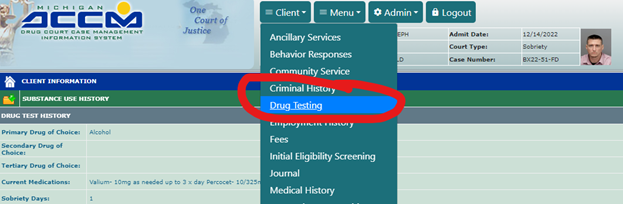
- Click on Client> Drug testing
- Click here to add a new result
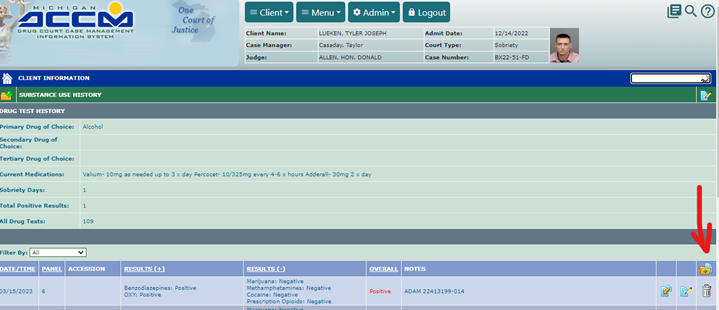
- Check the Batch report to match the system DCCMIS with that information

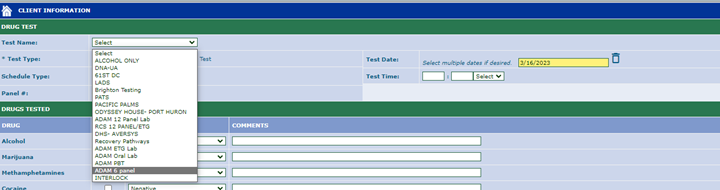
- Select Test Date, Test Time, Test Name which is the panel
- Find the positive substances in the list and change them to Positive.
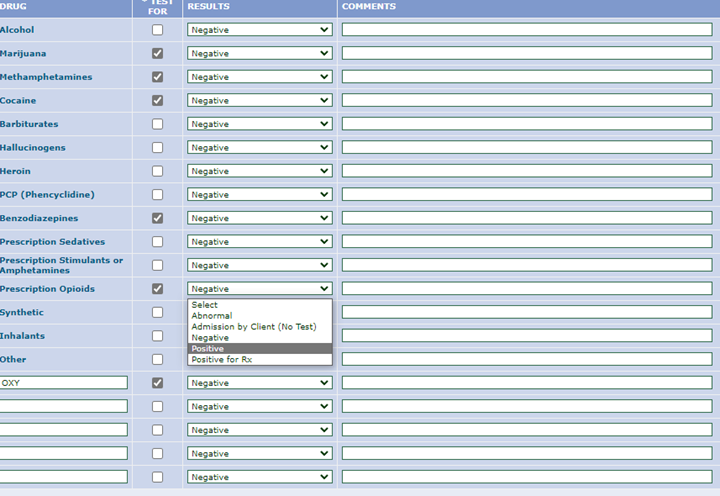
- Go to the Notes section in the bottom and paste the accession number found in the Batch report. Make sure it is 100% correct.

- Click Submit
When there’s a PBT:
Click on the Additional Alcohol Breath option, adjust results accordingly and submit.

When there’s a 12 panel:
When they do 12 panels, at the time we upload the panel, the results most likely will be pending. So you must put them on a list to check Aversys everyday until they are ready to upload. When the results are back, if they’re positive follow the above procedure and if they’re negative:
- Click here in the pending panel to modify

- Take out where it says results pending, delete that and submit:
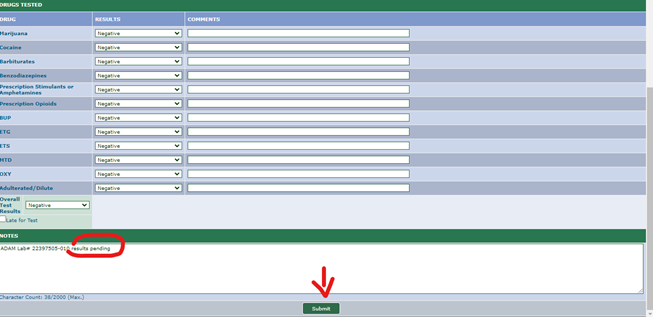
Make sure to remove this patient from your list.
NOTES
- Courts are not always entered the same: SSSPP, 30th Mental Health, Waterford. If I were to enter a 12 panel as opposed to all the rest of the courts where the drugs populate automatically, I would need to enter them manually. Caitlin will send over the list of what to select when entering those.
QUESTIONS
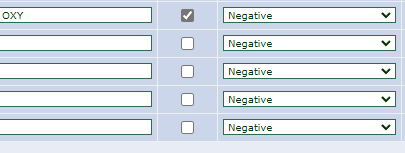
- Are all the substances always found in the panels? Would there be a time when we would have to manually type in a positive result like in these spaces?
Was this article helpful?
That’s Great!
Thank you for your feedback
Sorry! We couldn't be helpful
Thank you for your feedback
Feedback sent
We appreciate your effort and will try to fix the article