Using Knowledge Hub

Created by Joel Bissonnette, Modified on Wed, 10 Dec, 2025 at 1:34 PM by Joel Bissonnette

Accessing Knowledge Hub

  1. Click the Book Icon on the left hand side

A white line on a blue background

AI-generated content may be incorrect.

  1. Under Customer Service, click View All 10 Folders
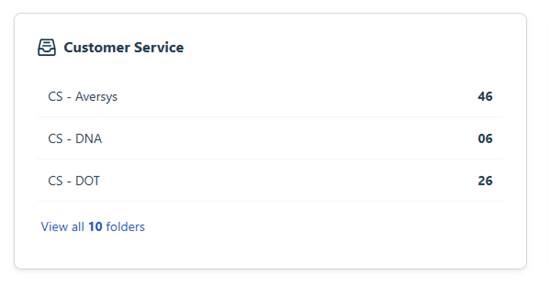
A screenshot of a computer

AI-generated content may be incorrect.

  1. Click on the Folder that you want to find knowledge
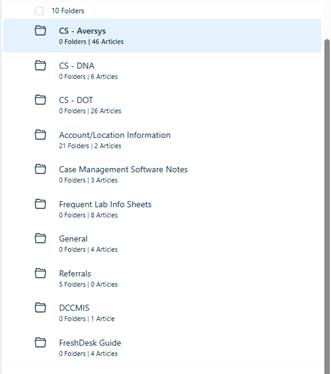
 

A screenshot of a computer

AI-generated content may be incorrect.


  1. Click on the Article that you want to review
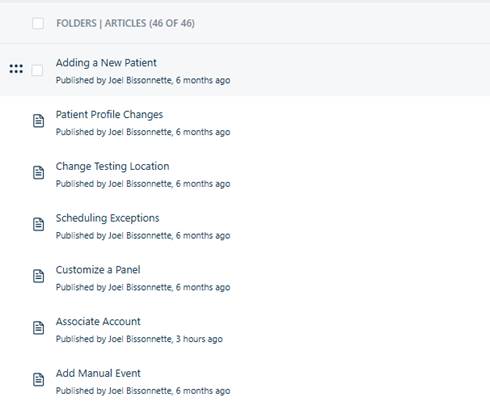
A screenshot of a computer

AI-generated content may be incorrect.

Was this article helpful?

That’s Great!

Thank you for your feedback

Sorry! We couldn't be helpful

Thank you for your feedback

Let us know how can we improve this article!

Select at least one of the reasons
CAPTCHA verification is required.

Feedback sent

We appreciate your effort and will try to fix the article